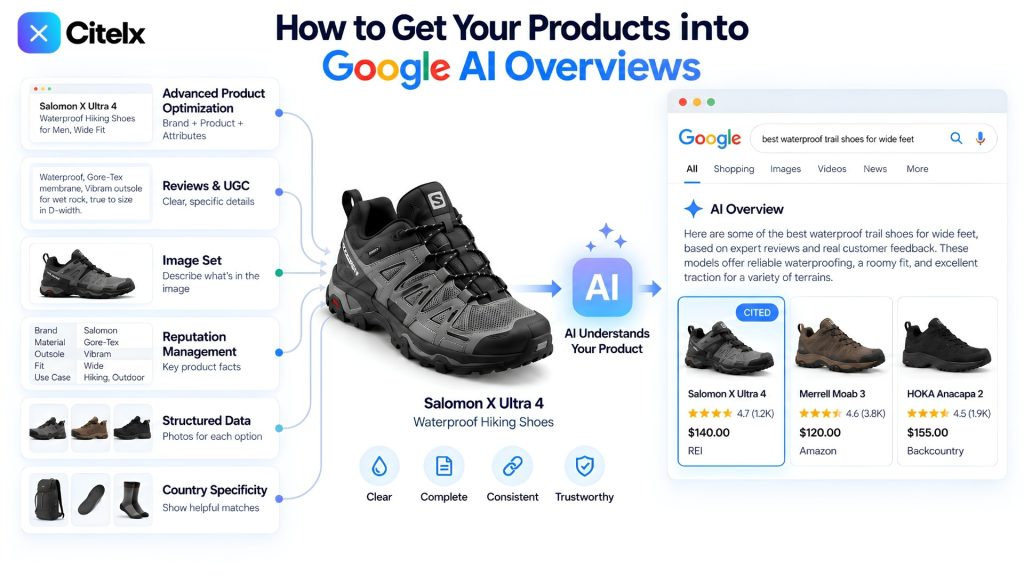
Search does not work the way it did two years ago. Someone types “best waterproof trail shoes for wide feet” and they do not get ten blue links to click through. They get one answer, with one or two brand names attached to it. If your product is not in that answer, you did not rank lower. For that search, you did not exist.
That is the shift most ecommerce stores have not caught up with. Google AI Overviews, ChatGPT and Perplexity do not crawl your page to rank it. They read it to describe your product to someone who will never open the page. If the page does not hand over clean facts, the AI describes a competitor who did.
This guide is for ecommerce specifically: eight things to fix, in the order they depend on each other, to get pulled into those answers.
1. Product optimization, from the basics up
Get this part wrong and nothing else matters. This is where an AI decides what your product is, who it fits and whether it is worth mentioning.
- Title. An AI pulls attributes from your title, not tone. “Premium Quality Hiking Shoes, Best Seller, Free Shipping” says nothing. “Nordic Hiking Shoes for Men, Waterproof, Wide Fit” says everything. The order is brand, product, attribute, fit.
- Description. Write to be quoted, not to fill space. “Durable, perfect for outdoor use” says nothing. “Waterproof, Gore-Tex membrane, Vibram outsole for wet rock, true to size in D width” is specific enough for an AI to lift whole.
- Alt text. Alt text is not a repeat of the title. It is a separate description of the image. “Nordic hiking shoe, side profile showing the Vibram outsole tread” tells a screen reader and an AI exactly what they are looking at, and it feeds Google’s image and visual search too.
- Specs and entities. Every product carries 30 to 60 facts a system could use to filter or describe it, and most pages expose about six. List the physical specs, compatibility, certifications and the situations the product is used in.
- Variations. Use real photographs for every color and material option, not color dots, and swap the gallery when someone picks a variant. Show out-of-stock options as disabled rather than hiding them. A hidden option makes a buyer think you do not carry it.
- Related products. Group by relationship, not by tag: “goes with this”, “needed for installation”, “an upgrade from”, “an alternative to”. Label why each one is shown. A labeled row earns more clicks than an unlabeled grid.
The full list runs to sixteen elements. Every one of them, with the fix for each, is on Product Page Optimization.
2. Reviews and UGC
A 4.6-star average convinces nobody, and it tells an AI very little. What gets picked up is a review that answers a real doubt: “fits wide feet”, “still waterproof after a year”, “true to size in a men’s 10”.
So do not just collect reviews. Build a small system for them, a review engine:
- Send a post-purchase email asking for a review a few days after delivery.
- Offer a small discount or coupon for a review that includes a photo.
- Pin the reviews that answer real doubts to the top, not only the five-star ones.
- Leave bad reviews up and reply to them in public. A page with no bad reviews looks fake.
- Use real customer photos alongside the studio shots. They show the true fit and the true color.
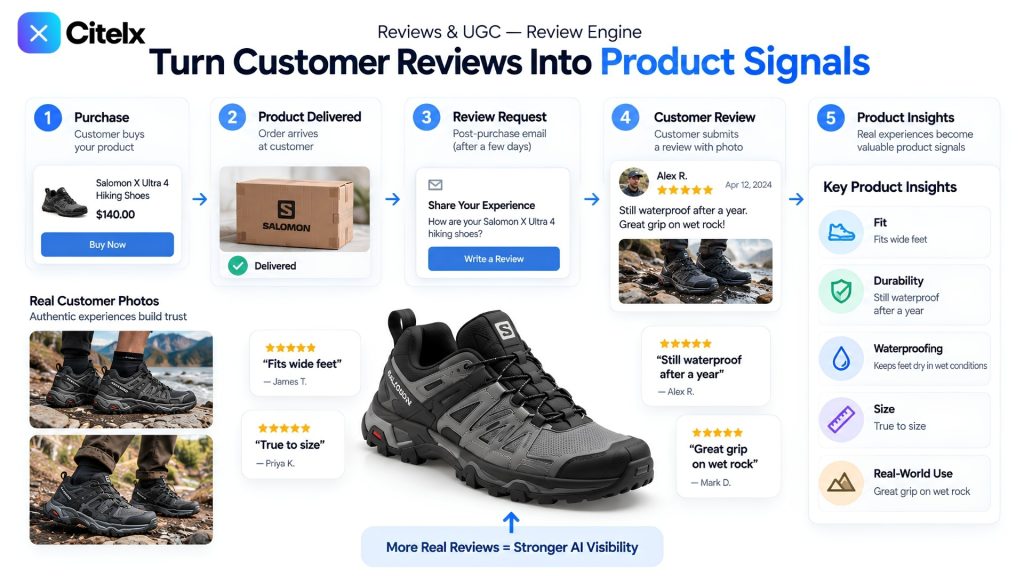
Do this and your customers end up writing your FAQ for you. There is no need to guess what buyers want to know. Read what they already wrote and use it.
3. Brand mentions across the web
One query now gets asked of six engines: Google AI Overviews, the LLM assistants (ChatGPT, Gemini, Perplexity), Meta AI, YouTube, TikTok and Pinterest. All of them answer the same buyer question. If your brand lives only on your own product page, you are invisible to five of the six.
An AI trusts a claim more when it sees the same thing repeated outside your own site: forums, comparison blogs, social mentions, YouTube and TikTok reviews. Even a mention with no link, just your brand name, builds the recognition these systems use to decide you are real and worth citing. It is slower than fixing your own page, and it is what makes an AI trust you over a competitor saying the same thing.
Each engine has its own rules, and we cover them one by one: YouTube, TikTok, Pinterest, Instagram and Facebook, and the LLM assistants.
4. The image set: nine shots
Most stores publish three photos, all the same white-background angle. That is not enough anymore. Nine shots, each answering a different question a buyer has before they add to cart, do more work than any amount of copy.
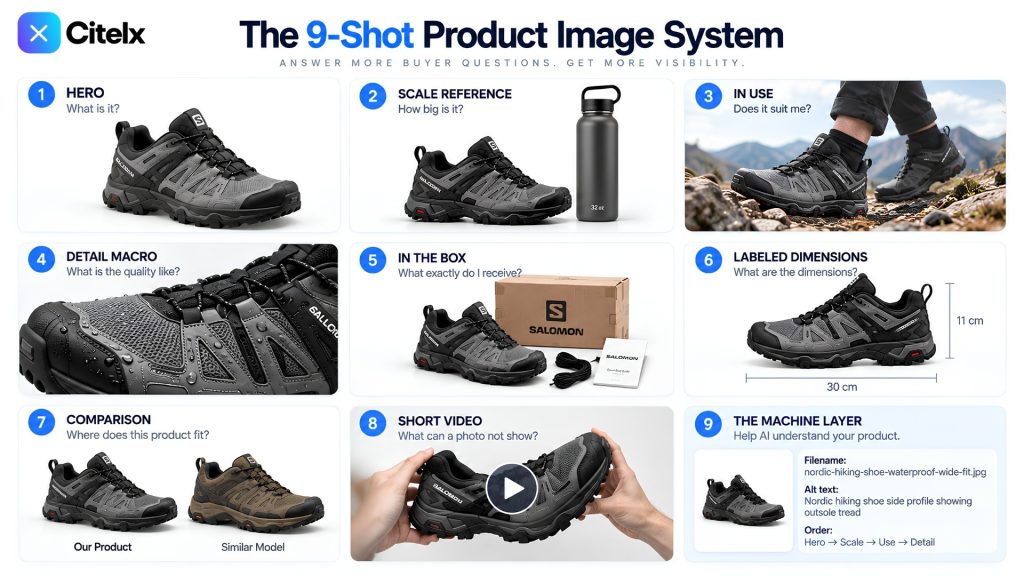
| # | Shot | What it shows | Why it matters |
|---|---|---|---|
| 1 | Hero | The product on its own, clean and clear | The first impression: what is it? |
| 2 | Scale reference | The product next to something familiar | Kills the most common size-related return before it happens |
| 3 | In use | The product worn or used in a real setting | Answers “does this suit me?” |
| 4 | Detail macro | A close-up of texture, stitching, tread or finish | Shows quality the way a buyer would check it in a shop |
| 5 | In the box | Everything included with the purchase | Sets accurate expectations and cuts “where is my accessory” complaints |
| 6 | Labeled dimensions | Measurements marked on the image itself | Removes the guesswork for anyone comparing sizes |
| 7 | Comparison | Side by side with the obvious alternative | Helps a buyer, and an AI, understand where it fits against competitors |
| 8 | Short video | The product moving, flexing or being used | Shows what a photo cannot: motion, fit, function |
| 9 | The machine layer | Descriptive filenames, informative alt text, a deliberate photo order, sharp compression | The layer nobody thinks about, and the one that feeds the AI |
5. Structured data and schema markup
Many stores stop at name, image and price in their Product schema. That tells a machine almost nothing beyond “this exists and costs money”.
Mark up everything that applies: brand, GTIN, MPN, material, color, size, itemCondition, availability, priceValidUntil, shippingDetails and hasMerchantReturnPolicy. Give each variant its own offer, grouped under a ProductGroup, so a specific size or color can surface in a filtered search. Connect aggregateRating and Review markup only to reviews that exist; faking it gets a page penalized. Add FAQ markup tied to questions you actually answer on the page. Complete and honest beats stuffed and fake, and it decides whether your product is even considered for a narrow search.
6. Country specificity
Someone searching for “best waterproof hiking shoes” in the US is shown US stores, not a global ranking. Optimize for “the world” and you become invisible for the exact country-specific search that converts a buyer.
So make your country clear everywhere it matters:
- In your schema, set
eligibleRegionon each offer andshippingDestinationin the shipping details to the country you sell in, withapplicableCountryon the return policy. Do not leave them blank. - Match your Google Merchant Center settings to the same country. Currency, shipping and availability should all point to one place, not be spread thin across regions you do not serve.
- Keep your language and spelling consistent with your country: color, not colour. A small detail, and a relevance signal.
- Avoid mixed signals. If your schema says one country and your feed or shipping settings say another, you dilute the relevance you have already earned in the market you actually serve.
7. Google Merchant Center, step by step
Merchant Center is where Google checks that what your page says matches what your feed says. One product, one set of facts.
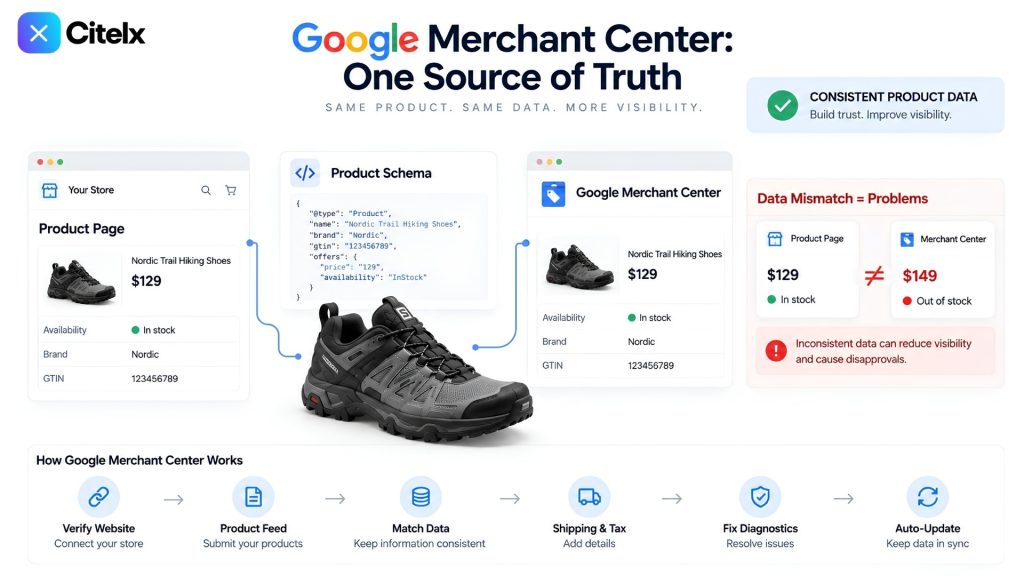
- Create a Merchant Center account and verify your website, so Google confirms you own the domain.
- Build your product feed, from Google Sheets, an XML file or the direct Shopify or WooCommerce connection, with title, description, price, availability, GTIN, brand and image link filled in for every product.
- Match the feed to your on-page schema exactly. A mismatch, such as “in stock” on one and “out of stock” on the other, gets flagged.
- Set shipping and tax rules for each country you sell to. This ties back to point 6.
- Submit the feed and clear every error in Diagnostics. Unresolved errors mean partial visibility or none.
- Set the feed to update on a schedule. Stale price or stock data gets a product dropped fast.
- Once live, check the Diagnostics tab under Products regularly. It flags problems before they cost you visibility.
8. Reputation management
Reviews on your own site are not enough on their own, because an AI checks the wider web before it trusts anything about your brand. If what it finds elsewhere, a forum comment, a marketplace listing, a comparison article, does not match your page, it does not overlook the gap. It drops your brand from the citation and picks a competitor. That is why showing up where your category is discussed matters. A review on your site helps a visitor who is already there. The same claim made in a public place is something an AI can find, check and cite.
Consistency is the other half. Keep your brand name, prices and specs identical everywhere they appear: your own site, Amazon, any marketplace, any article that mentions you. A mismatched price or spec reads as unreliable data, and unreliable data gets skipped rather than cited.
None of this works alone
A perfect title means nothing without schema behind it to confirm what it says. Five-star reviews do not earn a citation if the description under them is still vague. Nine good product photos will not save a page that is missing basic specs, or one whose price does not match what is listed somewhere else.
The stores that show up across Google AI Overviews, ChatGPT, Pinterest, TikTok, YouTube and Meta AI are not the ones that went deepest on one of these. They are the ones that got all eight right, even where no single one stands out. Consistency across the whole page beats brilliance in one corner of it.
To see where your own store stands, the free scan reads your live catalogue and shows which of these questions your pages already answer and which are still open. For the stage-by-stage version of this work, from a brand new store to an established one, read AI Overview Optimization for Shopify.